Quick Verdict: Top Picks
- Best OverallAnker SOLIX C1000 Gen 2100% in 49 minutes at 1,600 W, a 10 ms UPS and 2,000 W of output at 24.9 lb.Check Price for Anker SOLIX C1000 Gen 2 (opens Amazon in a new tab)
Picks are based on the manufacturer specs and the math in this guide. Prices change often, so check the current price on Amazon.
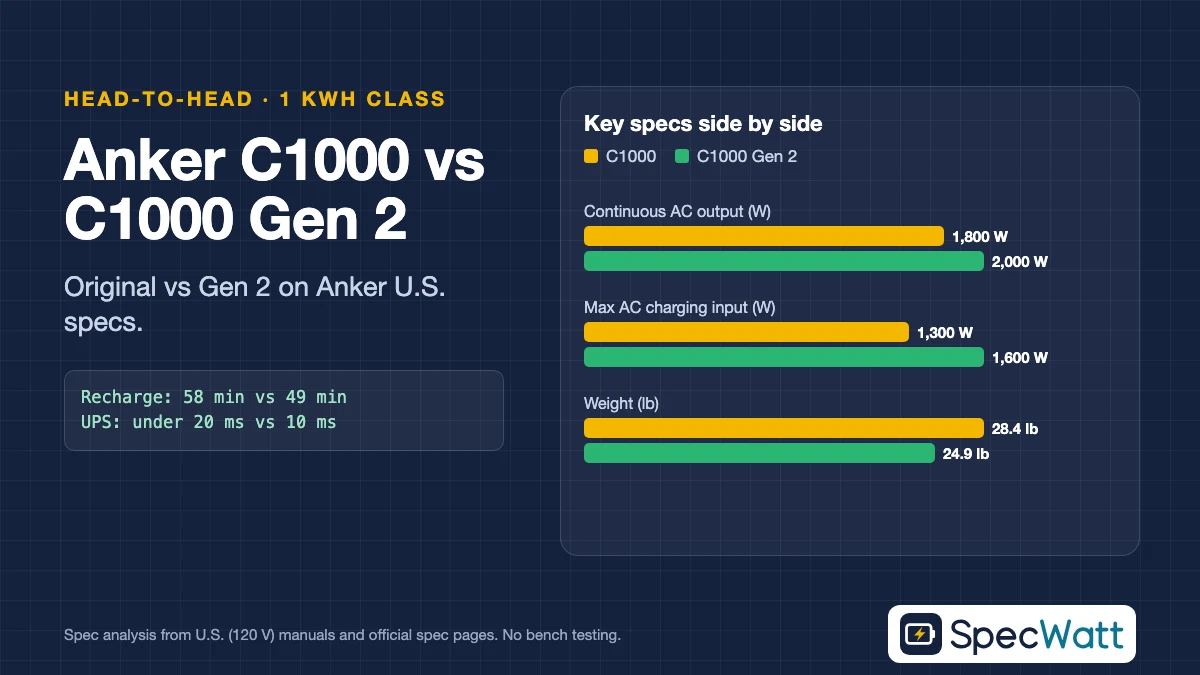
In the Anker C1000 vs C1000 Gen 2 comparison, the Gen 2 is the better buy for most people: it recharges from the wall in 49 minutes, switches to battery in 10 ms instead of under 20 ms, delivers 2,000 W instead of 1,800 W and weighs about 3.5 lb less. The original C1000 keeps one real advantage: it can take an expansion battery, and the Gen 2 can’t.
Both hold roughly 1,000 Wh (1,056 Wh of LiFePO4 on the original, 1,024 Wh on the Gen 2, whose U.S. page doesn’t name its cell chemistry), so runtimes differ by only a few percent. We compared them using Anker’s U.S. datasheet for the original (model A1761, Sales Market US/CA) and the Specs tab on Anker SOLIX’s U.S. page for the Gen 2 (A17631A1).
Category Winners: Anker C1000 vs C1000 Gen 2 at a Glance
Each row names the winner of one category in the Anker C1000 vs C1000 Gen 2 matchup and the Anker spec that decides it. Where the difference is too small to matter in practice, we call it a tie rather than stretch a few watt-hours into a win.
| Category | Winner | Deciding spec |
|---|---|---|
| Best Overall | Anker SOLIX C1000 Gen 2 | 49-min UltraFast recharge, 10 ms UPS, 2,000 W output |
| Fastest Recharge | Anker SOLIX C1000 Gen 2 | 1,600 W AC input vs. 1,300 W |
| Best for Expansion | Anker SOLIX C1000 | Expandable; Anker says the Gen 2 is not |
| Runtime | Tie | 1,056 Wh vs. 1,024 Wh, about 3% apart |
| Who should skip the Gen 2 | Buyers who want more than 1 kWh later | No expansion port |
| Who should skip the original | Desktop PC and NAS owners who want the shortest switchover | Under 20 ms UPS vs. 10 ms |
The Gen 2 wins every category tied to speed and output, which are the ones you notice in daily use and during short, frequent outages. The original’s case rests on expansion, and on whatever discount you can find for it now that Anker’s U.S. store leads with the Gen 2.
On November 19, 2026, Anker SOLIX’s U.S. store listed the C1000 Gen 2 at $699.99, with a Black Friday option showing $529.99. The original no longer appeared in that store’s search, while Anker’s main U.S. store listed it as the C1000X. Check the cards above for current listings.
Specs Side by Side
In this spec table, AC output is the continuous rating at 120 V, with the peak or SurgePad figure in parentheses. AC charging lists Anker’s maximum input and its published 0–100% time, and the UPS column is the switchover time when the grid drops.
Models at a glance
Anker SOLIX
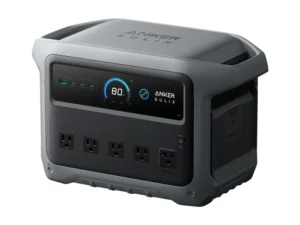
C1000 Gen 2
- Capacity1,024 Wh
- AC output (120 V)2,000 W (3,000 W peak)
- AC charging input1,600 W UltraFast (100% in 49 min)
Best for: 100% in 49 minutes at 1,600 W, a 10 ms UPS and 2,000 W of output at 24.9 lb.
Check Price on Amazon for Anker SOLIX C1000 Gen 2 (opens Amazon in a new tab)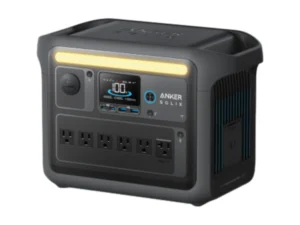
Anker SOLIX
C1000
- Capacity1,056 Wh LiFePO4
- AC output (120 V)1,800 W (2,400 W SurgePad)
- AC charging input1,300 W max (100% in 58 min)
Best for: Expandable with an extra battery; slightly more capacity (1,056 Wh) but a slower recharge and a UPS under 20 ms.
Check Price on Amazon for Anker SOLIX C1000 (opens Amazon in a new tab)Specs from each model's U.S. manual or official datasheet. Full comparison in the table below. As an Amazon Associate we earn from qualifying purchases.
| Model | Capacity | AC output (120 V) | AC charging input | Solar input | UPS switchover | USB-C max | Weight | Price |
|---|---|---|---|---|---|---|---|---|
| Anker SOLIX C1000 Gen 2 | 1,024 Wh | 2,000 W (3,000 W peak) | 1,600 W UltraFast (100% in 49 min) | 600 W, 11–60 V | 10 ms | 140 W | 24.9 lb | Check Price for Anker SOLIX C1000 Gen 2 (opens Amazon in a new tab) |
| Anker SOLIX C1000 | 1,056 Wh LiFePO4 | 1,800 W (2,400 W SurgePad) | 1,300 W max (100% in 58 min) | 600 W, 11–60 V | Under 20 ms | 100 W | 28.4 lb | Check Price for Anker SOLIX C1000 (opens Amazon in a new tab) |
Sources: Anker SOLIX C1000 Gen 2 U.S. Specs tab and its official Gen 2 vs C1000 comparison table, read November 19, 2026; Anker A1761 datasheet (Sales Market: US/CA). Anker’s comparison table lists 3,000 W peak for the original C1000; its U.S. datasheet lists a 2,400 W SurgePad rating, which is the figure we use. The original’s USB-C figure is from that datasheet.
The Gen 2’s solar input keeps the same 600 W ceiling and 60 V maximum, with two current limits: 8.2 A from 11 to 28 V and 14.5 A from 29 to 60 V. The original lists 10 A from 11 to 32 V and 12.5 A from 32 to 60 V. The original’s datasheet lists an XT-60 input and the Gen 2’s U.S. page shows an XT60i port, so confirm your panel lead’s connector on Anker’s U.S. page before reusing cables.
UltraFast charging on the Gen 2 has conditions. Anker says you enable it in the Anker app; its Specs tab lists a 1,200 W default AC input, and its FAQ says charging slows significantly when the battery cells are below 68°F. The 49-minute figure is a best case, not an everyday number.
Runtime Compared at 120 V
Runtimes in the Anker C1000 vs C1000 Gen 2 matchup are within about 3% of each other. Our formula treats 85% of rated capacity as usable, runs AC loads through an 85%-efficient inverter and adds an assumed 10 W of idle draw, since Anker publishes no idle figure for either model.
| Load (example, on AC) | C1000 Gen 2 | C1000 |
|---|---|---|
| Wi-Fi router and modem, 20 W | 26.0 h | 26.8 h |
| CPAP with humidifier and heated tube, 34 W | 17.4 h | 18.0 h |
| Refrigerator, 600 kWh/yr label (about 68.5 W average) | 9.6 h | 9.9 h |
| TV and streaming box, 100 W | 6.8 h | 7.0 h |
| Microwave drawing 1,500 W from the outlet | About 29 min | About 30 min |
Formula: hours = rated Wh × 0.85 ÷ (load W ÷ 0.85 + 10 W). The CPAP figure is ResMed’s published average for an AirSense 10 with humidifier and heated tube (doc. 1018673/1). Use your own appliance labels in the runtime calculator.
What the table can’t show is how quickly each one gets back to full. During rolling outages, or when you top up from a generator, the Gen 2’s 1,600 W input refills the battery in about 49 minutes under Anker’s conditions, while the original’s 1,300 W maximum takes about 58 minutes and its default 1,000 W mode about 90.
Scenario Breakdown: Which One for Your Situation
Pick by what you’ll power and how you’ll recharge. The table matches common situations in the Anker C1000 vs C1000 Gen 2 decision to the better model and the Anker spec behind it.
| Scenario | Better pick | Why |
|---|---|---|
| Desktop PC, router or NAS through outages | C1000 Gen 2 | 10 ms vs. under 20 ms switchover |
| Rolling outages or generator top-ups | C1000 Gen 2 | 1,600 W input, 49 min to 100% |
| Starlink Mini on USB-C | Either | Both list a 20 V/5 A USB-C profile |
| Laptop that draws more than 100 W | C1000 Gen 2 | 140 W USB-C port |
| You may want more than 1 kWh later | C1000 | Expandable; the Gen 2 is not |
| Carrying it to a campsite | C1000 Gen 2 | 24.9 lb vs. 28.4 lb |
| CPAP for a few nights | Either | About 17–18 h per charge on a 34 W CPAP |
For CPAP use, check your device manual and talk to your doctor or equipment supplier before relying on battery power. Anker lists 10 ms for the Gen 2 and under 20 ms for the original. If a desktop PC or NAS must not reboot, the shorter switchover leaves more margin; check your device’s power-supply hold-up time.
If you run a Starlink Mini, both meet the 100 W (20 V/5 A) USB Power Delivery requirement in Starlink’s spec sheet: the original’s 100 W port and the Gen 2’s 140 W port both list a 20 V/5 A profile, which lets you skip the inverter. Our Starlink power station guide has the runtime math for each Starlink kit.
Anker SOLIX C1000 Gen 2: Who It’s For
In the Anker C1000 vs C1000 Gen 2 matchup, the Gen 2 is for buyers who want a fast-refilling 1 kWh station for home backup, work and travel. Anker’s U.S. Specs tab lists 1,024 Wh, 2,000 W of AC output (3,000 W peak), 1,800 W of bypass, a 10 ms UPS and 80% capacity after 4,000 cycles.
It’s also the more compact unit at 24.9 lb and 15.12 × 8.19 × 9.61 inches, with ten ports in total including a 140 W USB-C and a 120 W car socket. The limit is capacity: Anker’s FAQ says the Gen 2 doesn’t include an expansion feature and recommends the original C1000 for buyers who need more.
Who should skip it: anyone who expects to need more than about 1 kWh later, since you’d have to buy a second station rather than add a battery.
Anker SOLIX C1000: Who It’s For
The original C1000 suits buyers who want a 1 kWh station today and room to expand tomorrow. Anker’s U.S. datasheet lists 1,056 Wh of LiFePO4 rated for 3,000+ cycles to 80%, 1,800 W of AC output with a 2,400 W SurgePad rating and a UPS under 20 ms.
It’s heavier at 28.4 lb, and Anker’s datasheet lists a 90-minute default recharge at 1,000 W, or about 58 minutes at its 1,300 W maximum. Buy it only at a clear discount to the Gen 2, and confirm the seller and warranty terms on any listing, since the U.S. store now sells it as the C1000X.
Who should skip it: owners of desktop PCs or NAS units who want the shortest switchover, and anyone who values a lighter station over expansion.
Our Verdict
For most buyers, the Anker C1000 vs C1000 Gen 2 choice goes to the Gen 2: faster recharging, a 10 ms UPS, 200 W more output and a lighter body, with runtimes about 3% below the original. Choose the original C1000 only if expansion matters to you and you find it at a clear discount.
Check current prices in the model cards above. To see how the C1000 line compares with EcoFlow, read our DELTA 3 Plus vs Anker SOLIX C1000 head-to-head or the 1000Wh comparison.
Frequently Asked Questions
For most buyers, the Gen 2. It recharges to 100% in 49 minutes at 1,600 W, switches over in 10 ms and delivers 2,000 W, per Anker’s U.S. specs. The original C1000 is better only if you want to add an expansion battery.
No. Anker’s FAQ for the C1000 Gen 2 says it doesn’t include an expansion feature, to keep weight and size down, and recommends the original C1000 for buyers who need expandable capacity.
No, slightly less. The Gen 2 lists 1,024 Wh and the original lists 1,056 Wh. Under our formula, that’s about 9.6 vs. 9.9 hours on a refrigerator with a 600 kWh/year label.
Enable UltraFast Charging in the Anker app with the AC cable connected. Anker says the default input is 1,200 W and that charging is much slower when the cells are below 68°F (20°C).
Yes. Its 2,000 W continuous rating is well above the roughly 1,200 W Honda lists for an Energy Star refrigerator’s start. A fridge with a 600 kWh/year label runs about 9.6 hours on it under our assumptions.