Quick Verdict: Top Picks
- Best OverallAnker SOLIX C1000 Gen 2About 19.6 h on a Mini via 140 W USB-C, about 6.8 h on a Standard via AC, and a 10 ms UPS.Check Price for Anker SOLIX C1000 Gen 2 (opens Amazon in a new tab)
- Best for Starlink MiniEcoFlow RIVER 2 Pro100 W USB-C in a 17.2 lb station: about 14.7 h on a Mini at 40 W.Check Price for EcoFlow RIVER 2 Pro (opens Amazon in a new tab)
- Best for All-Day StandardEcoFlow DELTA 3 Max2,048 Wh: about 13.6 h on a Standard at 100 W and about 39 h on a Mini via USB-C.Check Price for EcoFlow DELTA 3 Max (opens Amazon in a new tab)
- Best for Off-Grid SolarEcoFlow DELTA 2 Max1,000 W of solar input to refill while the dish runs, plus two 100 W USB-C ports.Check Price for EcoFlow DELTA 2 Max (opens Amazon in a new tab)
Picks are based on the manufacturer specs and the math in this guide. Prices change often, so check the current price on Amazon.
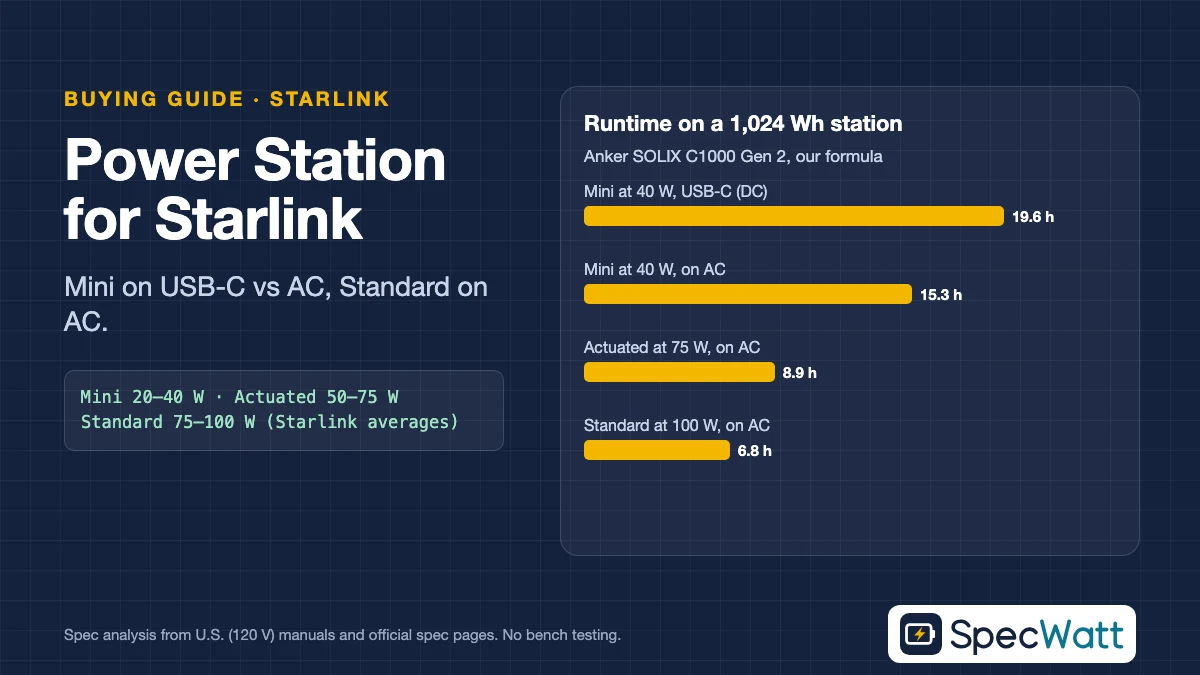
The best portable power station for Starlink depends on which dish you own. A Starlink Mini averages 20–40 W and can run straight from a 100 W USB-C port, so a 1 kWh station such as the Anker SOLIX C1000 Gen 2 powers it for about 20 hours at the top of that range. A Standard dish averages 75–100 W and needs AC power, which cuts runtime to roughly 7 hours on the same station.
Those consumption figures come from Starlink’s own Help Center, which says they’re averages of AC input power that include the dish, router, power supply and cables. We use them to size four stations, and we show the math for both the DC path and the AC path so you can see why the Mini’s USB-C option matters.
Our Top Picks: Award Criteria and Who Should Skip Each
Each award is based on the specs in the comparison table below. A portable power station for Starlink earns a pick when it powers the dish on the most efficient path available, DC for the Mini and AC for the Standard kits, and its capacity fits a realistic day of use.
| Award | Pick | Why it wins | Who should skip it |
|---|---|---|---|
| Best Overall | Anker SOLIX C1000 Gen 2 | 140 W USB-C for the Mini, 2,000 W AC for any kit, 10 ms UPS, 24.9 lb | Anyone who needs a full day on a Standard dish |
| Best for Starlink Mini | EcoFlow RIVER 2 Pro | 100 W USB-C in a 17.2 lb station, about 15 h on a Mini at 40 W | Standard and Actuated owners |
| Best for All-Day Standard | EcoFlow DELTA 3 Max | 2,048 Wh: about 13.6 h on a Standard at 100 W | Backpackers and anyone carrying it far |
| Best for Off-Grid Solar | EcoFlow DELTA 2 Max | 1,000 W of solar input to refill while the dish runs | Buyers who won’t use panels |
Award criteria. Best Overall must run every current Starlink kit, offer a USB-C port that meets the Mini’s 100 W requirement and switch over in 20 ms or less for home backup, and be the lightest station that does all three (24.9 lb vs. about 44.8 lb). The Mini award goes to the lightest station that still covers a long working day at 40 W. The Standard award goes to the most runtime, with ties broken by weight and switchover time, and the solar award to the highest solar input.
Every station here lists a USB-C profile of 20 V at 5 A, which meets the Mini’s USB Power Delivery requirement in Starlink’s spec sheet: 100 W, 20 V/5 A minimum, used with Starlink’s USB-C to Barrel Jack Cable accessory. That cable is sold separately in the Starlink Shop.
What Each Starlink Kit Draws
Starlink publishes average power figures for each kit in its Help Center. Size a portable power station for Starlink from the top of each range, since heavy use, cold weather that triggers snow melt and obstructed views all push consumption up.
| Starlink kit | Average draw | Idle draw | Power input | Runs on DC? |
|---|---|---|---|---|
| Starlink Mini | 20–40 W | 15 W | 12–48 V DC, 60 W; or USB-C PD 100 W (20 V/5 A) | Yes |
| Standard (Standard 4, Standard 4 X) | 75–100 W | 20 W | 100–240 V AC power supply, 2.5 A | No official DC input |
| Standard Actuated | 50–75 W | 20 W | Not listed in the Help Center | Not listed |
Sources: Starlink Help Center, “How much power does my Starlink need?” and “How can I power my Starlink Mini?”; Starlink Mini and Standard specification sheets, read November 19, 2026. The Mini spec sheet lists 25–40 W; the Help Center lists 20–40 W. Figures are averages of AC input power, including the router and power supply.
The Mini is the only kit Starlink lists for direct DC power. Its spec sheet accepts 12–48 V at 60 W through the barrel jack, or 100 W USB Power Delivery through Starlink’s adapter cable. The Standard kit ships with an AC power supply and a separate router, so it runs through the station’s inverter.
DC vs AC: Why the Path Changes Runtime
When a portable power station for Starlink runs the dish through its AC outlet, the battery’s DC power is converted to 120 V AC by the inverter, then back to DC by Starlink’s power supply. That double conversion wastes energy, and the inverter draws idle power whenever it’s on.
Our DC formula assumes 85% of rated capacity is usable and a 90%-efficient USB-C converter. Our AC formula uses the same 85% usable capacity, an 85%-efficient inverter and 10 W of idle draw, since we don’t have a published idle figure for these models. The 90% DC efficiency is our assumption, not a manufacturer spec.
There’s also a hidden margin on the DC path. Starlink’s averages include its own AC power supply’s losses, so a Mini fed from USB-C should draw somewhat less than the figures we use. We keep the published numbers anyway, so the DC runtimes in this guide are conservative.
Comparison: Four Stations for Starlink at 120 V
The table lists the specs that matter for a portable power station for Starlink: capacity, the USB-C port’s maximum output, AC rating at 120 V, switchover time for home use, solar input to refill in the field and weight.
Models at a glance
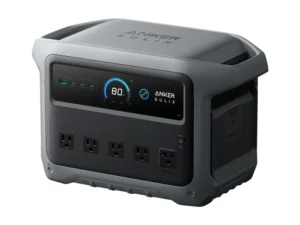
Anker SOLIX
C1000 Gen 2
- Capacity1,024 Wh
- USB-C max (per port)140 W
- AC output (120 V)2,000 W (3,000 W peak)
Best for: About 19.6 h on a Mini via 140 W USB-C, about 6.8 h on a Standard via AC, and a 10 ms UPS.
Check Price on Amazon for Anker SOLIX C1000 Gen 2 (opens Amazon in a new tab)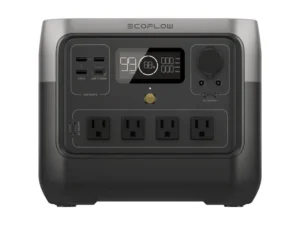
EcoFlow
RIVER 2 Pro
- Capacity768 Wh LFP
- USB-C max (per port)100 W
- AC output (120 V)800 W (1,600 W surge)
Best for: 100 W USB-C in a 17.2 lb station: about 14.7 h on a Mini at 40 W.
Check Price on Amazon for EcoFlow RIVER 2 Pro (opens Amazon in a new tab)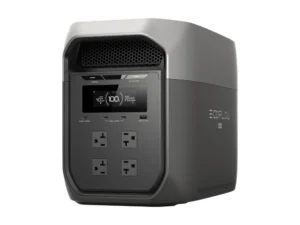
EcoFlow
DELTA 3 Max
- Capacity2,048 Wh LFP
- USB-C max (per port)100 W
- AC output (120 V)2,400 W (4,800 W surge)
Best for: 2,048 Wh: about 13.6 h on a Standard at 100 W and about 39 h on a Mini via USB-C.
Check Price on Amazon for EcoFlow DELTA 3 Max (opens Amazon in a new tab)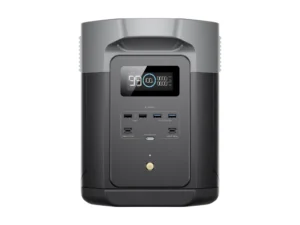
EcoFlow
DELTA 2 Max
- Capacity2,048 Wh LFP
- USB-C max (per port)100 W (2 ports)
- AC output (120 V)2,400 W (4,800 W surge)
Best for: 1,000 W of solar input to refill while the dish runs, plus two 100 W USB-C ports.
Check Price on Amazon for EcoFlow DELTA 2 Max (opens Amazon in a new tab)Specs from each model's U.S. manual or official datasheet. Full comparison in the table below. As an Amazon Associate we earn from qualifying purchases.
| Model | Capacity | USB-C max (per port) | AC output (120 V) | Outage switchover | Solar input | Weight | Price |
|---|---|---|---|---|---|---|---|
| Anker SOLIX C1000 Gen 2 | 1,024 Wh | 140 W | 2,000 W (3,000 W peak) | UPS, 10 ms | 600 W, 11–60 V | 24.9 lb | Check Price for Anker SOLIX C1000 Gen 2 (opens Amazon in a new tab) |
| EcoFlow RIVER 2 Pro | 768 Wh LFP | 100 W | 800 W (1,600 W surge) | Not listed | 220 W, 11–50 V | 17.2 lb | Check Price for EcoFlow RIVER 2 Pro (opens Amazon in a new tab) |
| EcoFlow DELTA 3 Max | 2,048 Wh LFP | 100 W | 2,400 W (4,800 W surge) | UPS, under 10 ms | 500 W max | About 44.8 lb | Check Price for EcoFlow DELTA 3 Max (opens Amazon in a new tab) |
| EcoFlow DELTA 2 Max | 2,048 Wh LFP | 100 W (2 ports) | 2,400 W (4,800 W surge) | EPS, 30 ms | 2 × 500 W, 11–60 V (1,000 W) | About 50 lb | Check Price for EcoFlow DELTA 2 Max (opens Amazon in a new tab) |
Sources: Anker SOLIX C1000 Gen 2 U.S. Specs tab; EcoFlow RIVER 2 Pro user manual and U.S. page; EcoFlow DELTA 3 Max U.S. spec page; EcoFlow DELTA 2 Max user manual (EFD350). Specs checked November 19, 2026. The DELTA 3 Max’s U.S. page lists 500 W solar input without voltage limits.
Runtime: Starlink Mini, Standard and Actuated
This table applies both formulas to each kit at the top and bottom of Starlink’s published ranges. For the Mini we show the USB-C path and the AC path side by side, so you can see what a portable power station for Starlink Mini gains by skipping the inverter.
| Starlink load | C1000 Gen 2 (1,024 Wh) | RIVER 2 Pro (768 Wh) | DELTA 3 Max / DELTA 2 Max (2,048 Wh) |
|---|---|---|---|
| Mini at 40 W, on USB-C (DC) | 19.6 h | 14.7 h | 39.2 h |
| Mini at 20 W, on USB-C (DC) | 39.2 h | 29.4 h | 78.3 h |
| Mini at 40 W, on AC | 15.3 h | 11.4 h | 30.5 h |
| Standard Actuated at 50 W, on AC | 12.6 h | 9.5 h | 25.3 h |
| Standard at 100 W, on AC | 6.8 h | 5.1 h | 13.6 h |
| Standard at 75 W, on AC | 8.9 h | 6.6 h | 17.7 h |
DC formula: hours = rated Wh × 0.85 ÷ (load W ÷ 0.90). AC formula: hours = rated Wh × 0.85 ÷ (load W ÷ 0.85 + 10 W). Loads are Starlink’s published averages; the Standard Actuated at its 75 W top figure matches the Standard row at 75 W. Laptops, phones and other devices on the same station shorten every figure; add them in our runtime calculator.
On the Mini at 40 W, the USB-C path runs about 28% longer than AC on every station. That’s the main reason we prefer a portable power station for Starlink Mini use that has a 100 W USB-C port, rather than relying on its AC outlets.
For a Standard dish, size a portable power station for Starlink by working hours. A 1 kWh station covers about 7–9 hours at 75–100 W, and a 2 kWh station about 14–18 hours. Beyond that, you need solar: a 400 W array with four hours of full-rated sun yields up to about 1,600 Wh, roughly 12–16 more hours of Standard use on AC.
Anker SOLIX C1000 Gen 2: Best Overall
The C1000 Gen 2 is our Best Overall pick among the stations in this guide because it handles every kit well. Its 140 W USB-C port exceeds the Mini’s 100 W requirement, its 2,000 W AC output runs a Standard with room for laptops, and its 10 ms UPS keeps the dish online through a home outage if it sits between the wall and the Starlink power supply.
Anker’s U.S. Specs tab lists 1,024 Wh, 600 W of solar input from 11 to 60 V and UltraFast charging to 100% in 49 minutes when enabled in the app. That works out to about 19.6 hours on a Mini at 40 W over USB-C, or about 6.8 hours on a Standard at 100 W. Anker’s U.S. store listed it at $699.99 on November 19, 2026, with a $529.99 Black Friday option.
Who should skip it: remote workers who need a Standard dish online for more than about 9 hours per charge without solar.
EcoFlow RIVER 2 Pro: Best for Starlink Mini
The RIVER 2 Pro is the lightest station here at 17.2 lb (per its manual), and EcoFlow’s U.S. page lists a USB-C port at 5/9/12/15/20 V and 5 A, 100 W maximum. That meets the Mini’s USB PD requirement and gives about 14.7 hours on a Mini at 40 W, or about 29 hours at 20 W.
Its 768 Wh LFP battery is rated for 3,000 cycles to 80%, and its 220 W solar input from 11 to 50 V returns up to about 880 Wh over four hours of full-rated sun, close to a day of Mini use at 25–30 W. EcoFlow’s U.S. store listed it at $369 on November 19, 2026. Its 800 W inverter covers a Standard plus laptops; the real limit when you use it as a portable power station for Starlink Standard kits is the 768 Wh battery.
Who should skip it: Standard owners who need more than about 5 to 7 hours per charge, or Actuated owners who need more than about 7 to 9.
EcoFlow DELTA 3 Max: Best for All-Day Standard
For a Standard dish used as a main internet connection, the DELTA 3 Max’s 2,048 Wh gives about 13.6 hours at 100 W and about 17.7 hours at 75 W on AC. Its 100 W USB-C port also runs a Mini for about 39 hours on DC, and the switchover under 10 ms suits home backup for a Standard installation.
EcoFlow’s U.S. page lists 2,400 W of AC output and 1,800 W wall charging to 80% in 68 minutes. It was $879 on EcoFlow’s U.S. store on November 19, 2026. At about 44.8 lb, it’s a station for a cabin, RV or home office rather than a trailhead, and its 500 W solar ceiling limits off-grid refills.
Who should skip it: anyone who carries gear on foot, and off-grid users who want more than 500 W of solar.
EcoFlow DELTA 2 Max: Best for Off-Grid Solar
The DELTA 2 Max has the same 2,048 Wh as the DELTA 3 Max, but its U.S. manual lists two solar inputs at 11–60 V and 15 A for 1,000 W combined. With enough panels, it can refill on a sunny day while the dish keeps running, which is what a full-time off-grid Starlink setup needs.
It also has two 100 W USB-C ports, six AC outlets and a 4 kWh option with a Smart Extra Battery on EcoFlow’s U.S. store. The tradeoffs are a 30 ms EPS switchover and about 50 lb of weight. It was $1,029 on EcoFlow’s U.S. store on November 19, 2026; our DELTA 2 Max vs DELTA 3 Max comparison covers the rest.
Who should skip it: buyers who won’t use solar panels, who get the same 2,048 Wh capacity for less in the DELTA 3 Max.
Our Verdict
Among the four in this guide, the Anker SOLIX C1000 Gen 2 is the best portable power station for Starlink for most owners: it runs a Mini on 140 W USB-C for about 20 hours at 40 W and a Standard on AC for about 7 hours, with a 10 ms UPS for home use. Choose the RIVER 2 Pro for a light Mini kit, or a 2,048 Wh EcoFlow for all-day Standard use.
Check current prices in the model cards above. To size panels for field recharging, see our solar panels for portable power stations guide and the Voc & MPPT compatibility checker.
Frequently Asked Questions
Starlink lists 20–40 W on average. On a 100 W USB-C port, a 1,024 Wh station runs it about 19.6 hours at 40 W under our assumptions, and a 768 Wh station about 14.7 hours. On AC, expect about 22% less.
Yes. Starlink’s spec sheet requires USB Power Delivery of at least 100 W (20 V/5 A), used with its USB-C to Barrel Jack Cable accessory. All four stations in this guide have a USB-C port rated at 100 W or more.
Starlink lists 75–100 W on average for the Standard (Standard 4 and 4 X), with 20 W at idle, and 50–75 W for the Standard Actuated. The figures are AC input averages including the router and power supply.
Starlink lists no official DC input for the Standard; it ships with a 100–240 V AC power supply. Run it from a power station’s AC outlet. The Mini is the kit Starlink lists for 12–48 V DC.
For a Mini, 768–1,024 Wh with a 100 W USB-C port covers about 15–20 hours at 40 W. For a Standard at 75–100 W, a 1,024 Wh station gives about 7–9 hours on AC, and a 2,048 Wh station about 14–18 hours.